MCP & AI
Tell the AI what you need.
It gets it done.
Model Context Protocol connects your AI assistant directly to your game server. It reads logs, restarts, backs up and installs – and you see every step.
How it works
An open standard. Your rules.
- Apps with sign-inClaude.ai, ChatGPT or connectors in Claude Desktop: add a custom connector with the address
https://dash.noveric.cc/mcp, sign in and choose what the app may do. - Developer toolsClaude Code, Cursor, VS Code: create a personal token in the panel and paste the generated configuration.
- Talk to your serverAsk questions and assign tasks. You decide which servers and actions the assistant can access.
Straight from the control panel
This is how it looks in the panel.
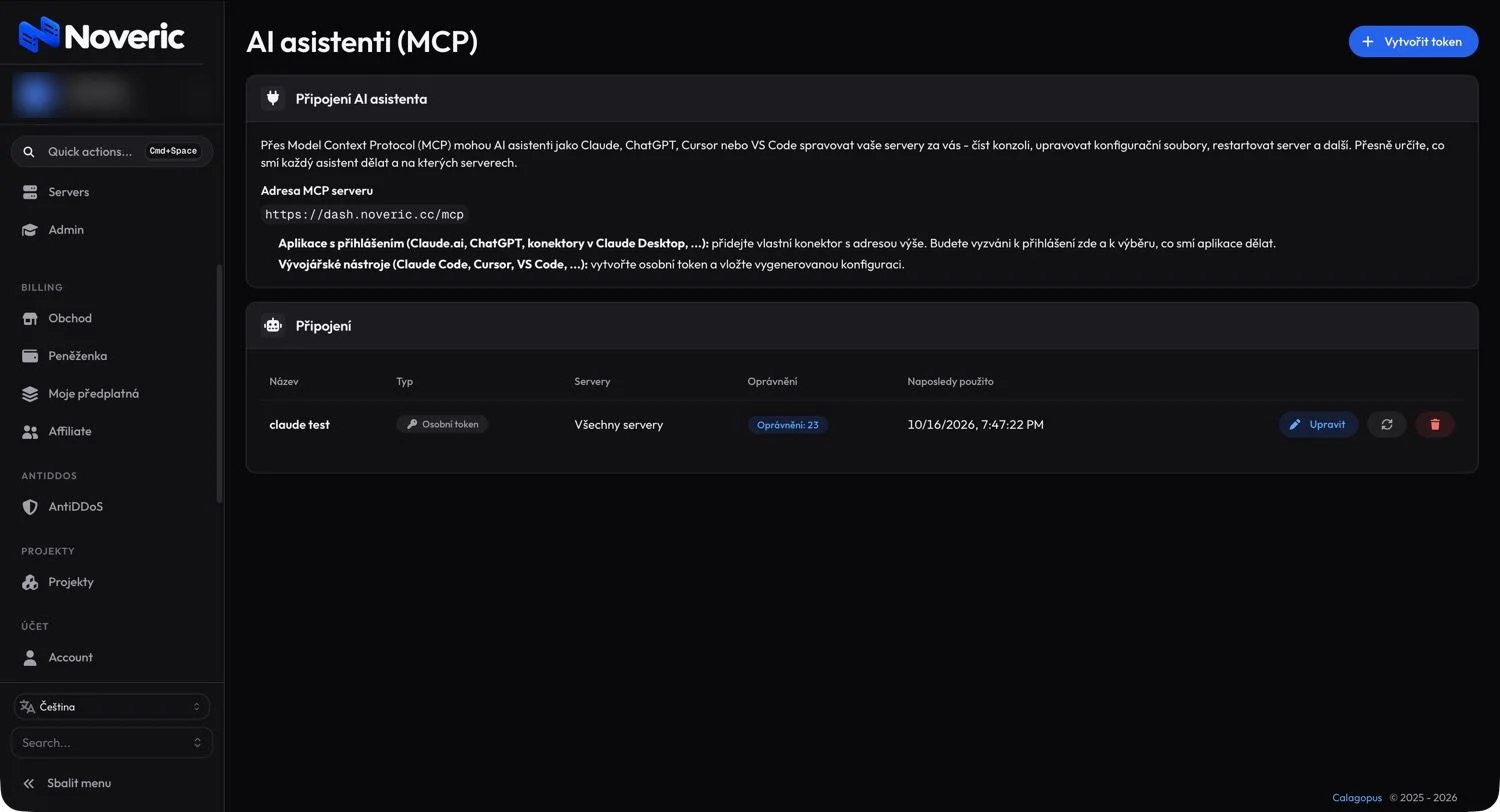
The AI assistants (MCP) section on dash.noveric.cc – the MCP server address, connection guide and an overview of tokens with permissions.
Tools
What the AI can do
The assistant works with the same features you use in the panel. Token permissions decide what it can access.
| Tool | Description |
|---|---|
| server.status | Server status, CPU/RAM usage, player count |
| server.power | Start, stop, restart |
| console.send | Send a command to the console |
| logs.read / logs.search | Read and search logs |
| files.read / files.write | Work with config and files |
| backups.create / restore | Create and restore backups |
| install.* | Install versions, frameworks, plugins and mods |
| schedules.* | Manage scheduled tasks |
Inspiration
Try something like this
„Why is my TPS dropping tonight? Go through the logs and suggest a fix.“
„Back up the server and update Paper to the latest build.“
„Schedule a nightly restart at 4:00 with a 5-minute warning for players.“
„Find out in server.cfg why the ox_inventory resource isn’t loading.“
„Prepare a wipe for Thursday 20:00 with a new seed and map size 3500.“
„Add the CF and Expansion mods to my DayZ server and check the load order.“
Security
Under your control.
Tokens with permissions
Read-only, management or full access. For one server or all of them.
Instant revocation
Revoke a token with one click.
Usage overview
For every connection you see its permissions, servers and when it was last used.
No password sharing
The AI never knows your login details, only a scoped token.
For a detailed intro, read MCP in the control panel · Need help? Discord
FAQ
MCP questions
Which AI apps can I connect?
Apps with sign-in such as Claude.ai, ChatGPT or connectors in Claude Desktop connect via a custom connector with the address https://dash.noveric.cc/mcp. Developer tools like Claude Code, Cursor or VS Code connect with a personal token and the generated configuration.
Is it secure?
You decide exactly what each assistant may do and on which servers. You can edit, rotate or delete a token at any time and see when it was last used.
Does MCP cost extra?
No, MCP integration is included in every plan. You pay for the AI app itself to its provider under their terms.
Can the AI do something irreversible?
You set the scope with the token’s permissions. For everyday use we recommend not allowing deletion or reinstalls, or having sensitive actions confirmed in the client.
A server that takes advice.
Pick a game, choose a plan and leave the rest to us. Performance, protection and the control panel are all included.